
Related Hydroponic Tools
Explore additional tools to help you plan, analyze, and optimize your hydroponic system more effectively:
- Grow Space Planner – Plan your indoor hydroponic garden layout with precise spacing and plant distribution.
- Multi-Crop Planner– A smart tool for planning 2 to 3 hydroponic crops together and checking compatibility.
- Plant Health Diagnosis Tool – Identify common plant issues by analyzing symptoms and get actionable recommendations to improve plant health.
Looking for a complete set of tools?
Explore the full collection of calculators, planners, and simulators in our main hub:
Hydroponic Tools Suite—your all-in-one resource for indoor growing planning, optimization, and learning.
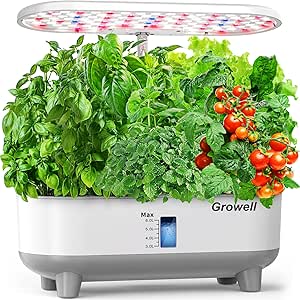
Top 4 Hydroponic Grow Kits on Amazon You Can Trust for Fast, Easy Setup


GrowSpace Simulator
Optimize Your Indoor Hydroponic Environment
Growing indoors gives you full control over your environment—but only when each factor is properly balanced. The GrowSpace Simulator helps you plan, visualize, and optimize your hydroponic grow space before you invest time, nutrients, or electricity.
Whether you’re a beginner setting up your first grow tent or an experienced grower refining conditions, this tool allows you to test environmental variables, monitor plant response, and avoid costly mistakes.
What Does the GrowSpace Simulator Do?
The simulator models how plants respond to key environmental factors in indoor hydroponics:
- pH Level – Controls nutrient availability
- EC Level (mS/cm)—Measures nutrient concentration
- Light Hours per Day—Drives photosynthesis and growth cycles
- Temperature (°C) – Affects metabolism and transpiration
By adjusting these variables, the simulator provides real-time feedback through a simulation dashboard showing plant health, growth progress, and system recommendations.
Key Parameters Overview (Snippet-Friendly Table)
| Parameter | Unit | Optimal Range (Example) | Effect on Plants |
|---|---|---|---|
| pH Level | pH | 5.5 – 6.5 | Nutrient uptake efficiency |
| EC Level | mS/cm | 1.5 – 2.0 | Nutrient strength |
| Light Hours | hours/day | 14 – 16 | Photosynthesis rate |
| Temperature | °C | 20 – 24 | Growth and metabolism |
How to Use the GrowSpace Simulator
1. Select Your Crop
Choose from common hydroponic crops such as lettuce, tomato, pepper, or basil, or define a custom crop with your own parameters.
2. Adjust Environmental Controls
Set your grow conditions using input fields or sliders:
- pH (e.g., 5.3)
- EC Level (e.g., 2.3 mS/cm)
- Light Hours (e.g., 14 hours/day)
- Temperature (e.g., 19°C)
3. View the Simulation Dashboard
As you adjust parameters, the dashboard updates instantly:
- Growth Progress – Estimated growth stage toward harvest
- Plant Health – Overall plant condition percentage
- Critical Alerts – Warnings for out-of-range values
4. Apply Recommendations
The simulator provides optimized settings. You can:
- Apply recommended values automatically
- Or manually experiment and compare outcomes
5. Learn from Simulation Feedback
If conditions are far from optimal, the simulator may display a simulation failure warning with clear explanations. This helps you understand plant tolerance limits and avoid real-world crop loss.
Simulation Example: Grow Roses Hydroponically
Scenario: Suboptimal Grow Conditions
| Parameter | Value |
|---|---|
| pH | 5.3 |
| EC | 2.3 mS/cm |
| Light Hours | 14 |
| Temperature | 19°C |
Target Ranges
| Parameter | Optimal Range |
|---|---|
| pH | 5.5 – 6.5 |
| EC | 1.5 – 2.0 mS/cm |
| Light | 16 hours/day |
| Temperature | 20 – 24°C |
Simulation Output
- Growth Progress: 25%
- Plant Health: Critical
Recommendations
- Increase pH to optimal range (5.5–6.5)
- Reduce EC to 1.5–2.0 mS/cm
- Increase light duration to 16 hours/day
- Raise temperature to 20°C+
Ignoring these adjustments may lead to poor growth or crop failure. Applying them improves plant health and accelerates growth.
Why Use a Grow Space Simulator?
| Benefit | Description |
|---|---|
| Prevent Crop Failure | Detect harmful conditions early |
| Save Resources | Avoid wasting nutrients, water, and electricity |
| Faster Learning | Experiment safely without real-world risk |
| Better Planning | Design efficient grow tent or indoor grow layouts |
| Yield Optimization | Improve plant spacing and environmental balance |
Frequently Asked Questions
What is the GrowSpace Simulator?
The GrowSpace Simulator is an interactive tool that allows you to design, test, and optimize your indoor hydroponic environment by adjusting factors like pH, EC, light, and temperature.
What is the ideal pH and EC for hydroponics?
Most hydroponic plants grow best at a pH between 5.5 and 6.5 and an EC range of 1.5 to 2.5 mS/cm, depending on the crop and growth stage.
Is this simulator only for hydroponics?
The tool is optimized for hydroponic systems, but it can also be applied to any indoor growing environment where pH, EC, light, and temperature are controlled.
What if I grow a crop not listed?
You can use the Custom Crop feature to define your own optimal ranges for environmental parameters.
Can I save my simulation settings?
Currently, the simulator is designed for live testing and planning. You can manually apply the insights to your actual grow setup.
How accurate is the simulation?
The model is based on established horticultural science and typical optimal ranges. While real-world results may vary due to genetics and environmental differences, it provides a reliable planning baseline.
Start Simulating Your Growth Today
Don’t leave your indoor garden to chance. Use the GrowSpace Simulator to design a controlled, efficient, and optimized growing environment before planting your seeds.